
Image Resizer
Resize your images online quickly and easily
Upload Your Image
Drag & drop your image here or click to browse
Image Preview
Original Image
Resized Image
High-Quality Photo Compression Online Without Losing Quality
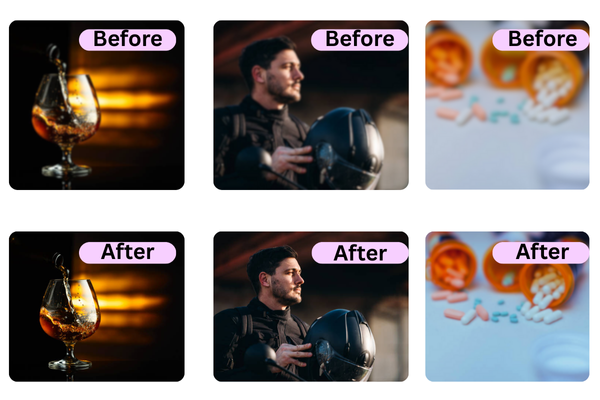
How much can a photo be compressed without losing quality?
- Upload your image directly from your device using the simple drag and drop interface. The tool instantly loads your photo without any delays or quality changes.
- Choose the exact width and height or select from preset sizes for perfect results. The tool automatically maintains clarity while resizing your photo accurately.
- After resizing, click download to save your optimized image in seconds. Your file is delivered in high quality with no blur, loss, or distortion.
Optimize Photos While Keeping Full Clarity

Perfect Quality
Resize your images without losing clarity or sharpness.

Easy to Use
Upload, adjust size, and download in just a few simple steps.

Privacy Guaranteed
Your images are processed securely and never stored or shared.
Can I compress JPG and PNG images without reducing clarity?
Yes, you absolutely can compress both JPG and PNG images without visibly reducing their clarity using our advanced tool. Our intelligent algorithm optimizes file size by removing unnecessary, hidden data like embedded metadata while meticulously preserving the core pixels you see. For JPGs, it fine-tunes the compression ratio to shrink files without creating artifacts; for PNGs, it uses a lossless technique that reduces size without altering a single displayed pixel. The result is a significantly lighter file that remains visually identical to the original on any screen. This perfect balance allows for faster uploads and saves storage space without any sacrifice to your image's quality.
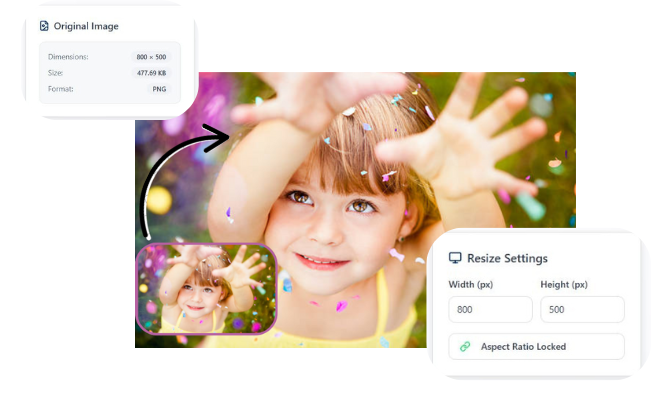
Compress Photos Without Quality Loss
Compress Photos Without Quality Loss allows you to reduce image size while keeping every detail clear and sharp. This advanced compressor uses smart, lossless optimization so your photos stay high quality without blur or distortion. It helps you save storage space, speed up website loading times, and share images faster across any platform. The tool supports all major formats like JPG, PNG, and JPEG with clean, accurate compression results. Your files remain completely secure because the process happens safely without storing or sharing your images. It works instantly on any device, giving you quick and reliable photo compression in just one click. With reduced file sizes and perfect clarity, your images remain professional and ready for online use. This lossless photo compression tool ensures better performance, privacy, and convenience for every user.
Frequently Asked Questions
1. Is it really possible to compress a photo without any quality loss?
Yes, using lossless compression techniques. This method removes only unnecessary, hidden data (like metadata) or uses more efficient encoding without altering the visible pixels of your image, keeping it visually identical.
2. Which image formats can be compressed without quality loss?
PNG and TIFF formats are inherently designed for lossless compression. JPG files can also be optimized (a form of lossy compression) at high quality settings to shrink size with a negligible, often invisible, loss in clarity.
3. Will the compressed image look pixelated or blurry?
No, not when done correctly with a proper lossless tool. If you start with a high quality image and use a reputable compressor, the final result will maintain its original sharpness, color, and detail.
4. How much can I reduce the file size without losing quality?
It depends on the original file. Typically, lossless compression can reduce PNGs by 10-50% and optimize JPGs by 20-80% without visible quality loss. Extremely high-quality originals often see the greatest savings.
5. Can I compress a photo multiple times without degrading it?
For lossless formats (PNG), yes, you can recompress repeatedly without cumulative damage. For JPGs, each new lossy compression cycle can further degrade quality, so it's best to always recompress from the original high quality source.
6. Why should I compress photos if I want to keep the quality?
To save crucial storage space on devices and cloud services, dramatically speed up website loading times (boosting SEO and user experience), and meet strict file size limits for email, social media, or professional uploads all while keeping your photos looking perfect.
Leave a Reply